
Song Displayer is a WordPress plugin that displays what is playing in Winamp or SAM Broadcaster on your blog.

How it works
The plugin consists of 4 files.
mp3-in.php is a template for Winamp, used to generate the playlist.
mp3-in-sam.php is a template for SAM Broadcaster, used to generate the playlist.
mp3-out.php is the generated playlist with ID3-tags. This file will be uploaded on your server every time a song plays.
song_displayer.php is the WordPress plugin to be placed into your /wp-contents/plugins/ directory.
The plugin reads the generated playlist and extracts the information to display the data contained in the ID3v1 tags.
Vos mises à jour vous font peur ?
PHP 8.x qui casse un plugin, un thème qui n'est plus maintenu, une mise à jour de WooCommerce qui change tout — je gère les montées de version proprement, avec environnement de staging et rollback prévu.
Mettons votre stack à jour sans risque →If the tags are incomplete or missing, the plugin displays the name of the files.
By default, the artist name and song title is displayed, along with the album title if available.
If the playlist hasn’t been regenerated in the laps of time you define, the plugin assumes your webradio is off and displays a ‘Radio is off’ message.
Otherwise, it displays the song info on your blog and you can link it to your Shoutcast or Icecast stream.
Download
https://www.skyminds.net/?download=song_displayer
Install guide for Winamp
First, you need the DoSomething plugin for Winamp.
Once installed, go to Winamp > Préférences > Plugins > General Purpose > DoSomething and select Configure.
Activate the plugin by unticking the Disable Plugin box.
Playlist creation
In the drop-down menu, select Generate HTML Playlist. In Template In, enter the path of MP3-in.php that resides on your hard-drive.
Do the same for Template Out with MP3-out.php. Click Update to save the changes.

Upload the playlist on your server via FTP
Once the playlist generated, you need to upload it on your server.
Select the FTP service in the drop-down menu and fill in the fields with your FTP account info :

That’s it. Now on to the plugin configuration.
Install guide for SAM Broadcaster
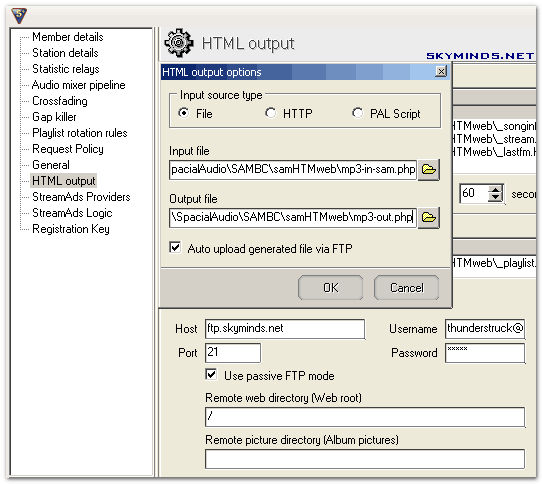
Setting up the playlist generation in SAM is pretty straight-forward :
- place mp3-in-sam.php and mp3-out.php in your
/Program Files/SpacialAudio/SAMBC/samHTMweb/directory. - go to File > Config > HTML Output and add a new rule for playlist generation, using
mp3-in-sam.phpas input file andmp3-out.phpas output file. - tick Auto-upload generated file via FTP and configure your FTP access.
- done !
Here is a screenshot of the configuration on SAM :

Plugin configuration
Upload the plugin
You now need to upload song_displayer.php in your /wp-contents/plugins/ directory.
Chmod it 666 with your FTP client (right-click on the file > Chmod/permissions > 666) to be able to edit it via WordPress plugin editor.
The plugin has got 3 options: the URL of the playlist (mp3-out.php) from the index page of your blog, the delay in seconds before assuming Winamp is turned off (7 minutes by default – edit this value according to the average length of your songs) and the URL of your webradio stream if you have one.
Data integration on your blog
This is the last step : add the following code to your sidebar.php template where you want the information to appear :
<?php if(function_exists('show_playlist')) { show_playlist(1, " - ", ""); }Langage du code : HTML, XML (xml)Function parameters
First parameter : number of lines to display. Default is 1 : current song.
Second parameter : separator between artist and song names.
Third parameter : separator used for multiple lines. Default is blank, otherwise put a linebreak.
That’s it ! You should now be set and have what’s playing in Winamp or SAM Broadcaster displayed on your blog.
Note : this is a translation of the original French tutorial of Song Displayer. WordPress Plugins page.
Un projet WordPress en tête ?
Vous avez une idée claire de ce que vous voulez, mais pas les ressources en interne pour le faire bien. Je développe des sites et extensions WordPress sur-mesure — sans délais à rallonge ni mauvaises surprises.
Décrivez-moi votre projet →

THANKS! I appreciate your help very much :)
My pleasure Hazel :)
I’ve been playing with this plugin all day. It always says “Radio is off !”. I have $playlist and file permissions set correctly. I started playing with the code and have not been able to get it to work at all. No matter what I do I cannot get it to display any data.
Hello golddave,
Is the playlist uploaded correctly ? If you access it in your browser, does it reflect what you’re playing ? What is your value in $playlist ?
I got it to work. Everything was working fine but the path I put in for $playlist didn’t account for the fact that I’m on a shared host. I had /public_html/mp3-out.php but since I’m on a shared host I really needed /home/golddave/public_html/mp3-out.php. Once I made that change it worked fine.
I’m glad you’re sorted golddave :)
Hi, it took me 15 minutes, but it works fine! But the « DoSomething plugin for Winamp » is what makes me troubles. Since its installation Winamp crashes everytime I try to play some net-radio. Anybody knows what to do??
Hi carpenter,
You need to disable the plugin when playing net-radios as it’s intended for local music only.
Hope that helps,
Hi, I would like to show more than only the last song on my page. Is there a way how to set it up?
Hello carpenter,
To display the last 5 recently played songs, put :
Hi, I’ve been having a similar problem to what other have had: The DoSomething plugin works fine and the mp3-out.php uploads correctly, but for some reason the song_displayer.php file can’t pull it up. It just says the radio is off. I’ve tried setting the delay lower and it doesn’t work. The location of the mp3-out file is also correct — /home/.ellis/username/folder/mp3-out.php. The plugin used to work perfectly, but now for some reason it has stopped (I didn’t make any changes to the files).
Hello Jon,
Can you give me the mp3-out.php and the plugin URL via email ? Thanks.
Updated tutorial with SAM Broadcaster configuration.
I just stumbled on this plugin and have a couple of curious questions. I am not even sure if this plugin is supported any more looking at the dates of these posts but I am dearly hoping someone has an answer.
Like golddave above, I only get « Radio is off ! » no matter what. I verified through the player that the player is connected and the stream is live. I have played multiple songs but still the plugin does not see my stream. Steps I have taken to troubleshooting are as follows:
$playlist = "/public_html/faelandaea/sam_broadcaster/song_displayer/mp3-out.php";This is the path to my mp3-out file. I have also generated it via SAM Broadcaster and assured that the file is present in that directory.
$stream = 'http://75.70.157.193:8000/live';This is the correct stream, copied directly from my player’s settings. Nothing is missing.
This is precisely how the code appears in my sidebar-1.php. At least I know that worked, since the « Radio is off! » text seems to be appearing on my page.
I greatly appreciate any assistance for this.
Hmm the php line didn;t appear in the post above. here it is so that all info is included:
Hi Faelandaea,
Apparently the php code got stripped out, I’ll have to look into it.
Here are a couple of pointers :
– check that
mp3-out.phpgets uploaded to your server.– check that the delay in seconds in the plugin matches the average duration of your songs.
Best regards
Thank you so much for the response.
Verified. SAM is successfully uploading the file to the directory.
$delay = 420;My songs vary greatly, but for the most part an average song’s length is 4 minutes, with some of the longer songs ranging to 7 minutes. Is it safer to put this number greater or less than the average length?
It’s safer to put in a greater number.
If you launch mp3-out.php from your server in your browser, can you see the name of the song you’re currently playing ?
Good question! I should have stated that before and I apologize for missing that, but yes that is part of how I verified that SAM was properly uploading the file. If I manually open it I do see the current song.
No worries, it helps narrowing down the issue.
Can you edit song_displayer.php and remove the @ sign in lines 69 and 70 ? We’ll see if there’s no error in the playlist file path.
I took the @ signs out of 69 and 70. Started SAM and my server. Song is playing and stream is good . . . still says « Radio is off » What I am thinking now is path to my directory for the php file SAM is uploading or that the script is not seeing my stream. I am leaning toward the script not seeing my stream somehow but still confused.
Just an addendum . . . what am I looking for with that last edit to see if my path is incorrect? I started changing the path in the file and even purposefully made it incorrect once and I get no change in the behavior of the main page – still simply says « Radio is off! » I am not sure if this information helps or not.
The @ sign suppresses any error so removing it should display errors if any.
Can you contact me via email so I can email you a debug version of the script ?